Post by: Gregg on July 26, 2007, 01:00:24 PM
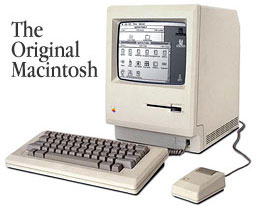
In the article, it mentions that the original Mac keyboards had fewer keys than the competition. When Mr. Jobs left Apple in 1985, a new keyboard was introduced, nearly doubling the number of keys! It proved to be quite popular.
Now, I'm curious, but not enough to attempt a lengthy search (I've rarely done a quick one) to find a photo of one of the early keyboards. I'm betting several members had one, or still do, and that a few have enough curiosity, and time, to scrounge up a picture or two. How 'bout it?
Post by: Parker on July 26, 2007, 03:35:21 PM

The original macintosh keyboard
Apple IIgs, Mac Classic, etc. (one of the first keyboards with numbers)

and notice... no F# keys (F1, F2, etc.)
The Keyboard with almost double the keys (F keys, numbers, arrows, pg up/down, etc.)

Steve takes a break from Big with apple's first usb keyboard

They change their minds with the USB Pro Keyboard

They go wireless!

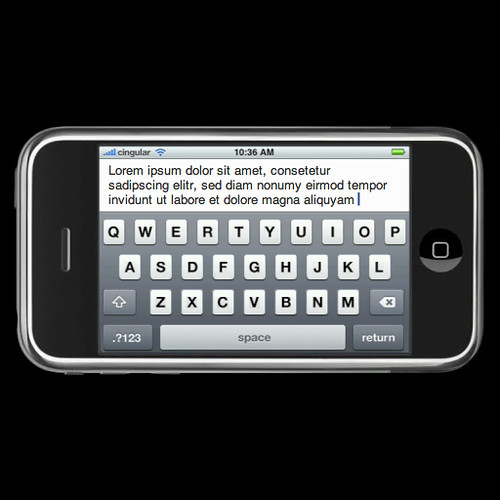
THE NEXT GENERATION! No physical keyboard!!!
This may not be complete. Feel free to add

Post by: krissel on July 27, 2007, 01:58:49 AM

Here's the oldie (not my personal one cause mine have some letters worn off that I have to redraw occasionally with a Sharpie).
ADB keyboard

Post by: Gregg on July 27, 2007, 07:42:42 AM
 s! That pretty much covers it, eh?
I didn't count keys, but "almost double" seems like a stretch at a glance.
Post by: Parker on July 27, 2007, 08:22:51 PM
(the only problem is that i get the control and apple keys mixed up... alternate OS perseption
 )
and PS:
the iPhone keyboard absolutely stinks!
i tried it today and that's enough to turn me off from buying one of those things
Post by: krissel on July 28, 2007, 12:45:13 AM

One other thing that gets me annoyed is where they put the little finger starting dots. On my keyboards the K and D have the dots but on my Wallstreet the J and the F have the dots. If you use only one keyboard it doesn't matter but switching between them puts me off my speed for a while.

Post by: sandbox on July 28, 2007, 09:50:56 AM

Post by: kcourt on July 28, 2007, 11:01:35 AM
Kathy

Post by: Gregg on July 28, 2007, 04:38:18 PM
QUOTE(krissel @ Jul 28 2007, 12:45 AM) <{POST_SNAPBACK}>
One other thing that gets me annoyed is where they put the little finger starting dots. On my keyboards the K and D have the dots but on my Wallstreet the J and the F have the dots.
...one more thing to _ace the competition battle. I hope the K and D win. I think we could do without the J and F much more easily.
Post by: Xairbusdriver on July 30, 2007, 06:27:29 PM


I also hated those black keyboards, it was nearly impossible to see the letters; too shiny, too dark, lettering too small, etc.

Only gave up the ABD keyboard when I got a slightly smaller USB model. They were/are the best, but I need more space on the real desktop for storing/stacking more junque!
Post by: kimmer on July 30, 2007, 08:29:25 PM
QUOTE(krissel @ Jul 27 2007, 10:45 PM) <{POST_SNAPBACK}>
One other thing that gets me annoyed is where they put the little finger starting dots. On my keyboards the K and D have the dots but on my Wallstreet the J and the F have the dots.
It's been several years since I've used (or even seen) a typewriter, but weren't the "F" and "J" keys the ones with the home bumps? That's where I remember them anyhow, and that's where I expect them to be. Anywhere else is simply an annoyance and will cause me to put punctuation marks where they don't belong.

My current keyboard is most comfortable. It's the one that came with my G4 Quicksilver. My only dislike is the keys being black -- I cannot read them without 10,000 watts of direct light that then melts the keys. LOL!
I wish I had purchased the white key replacement while it was available; then I'd have keys I could read and my keyboard skin would work.
Post by: Gregg on July 31, 2007, 07:39:12 AM
I had a black keyboard for my Macintosh TV. The letters were white. You can't get much more contrast than that. I never had a problem seeing them, but I do "touch type" so it wouldn't have been much of an issue.
Post by: Xairbusdriver on July 31, 2007, 03:26:05 PM
QUOTE
You can't get much more contrast than that.
Contrast and readability are two although related factors. A thin white line/letter on a highly reflective/shinny black key is more difficult to see than an equal sized black line/letter on a dull, slightly off-white key, IMHO. Thus the improvement when the Mac created a WYSIWYG, black letters on a white screen effect. Oh well, keyboard usability is much more than the color of the keys and letters, anyway. Many are comfortable with typewriter-style, mechanical keys. That feel was mimicked for a while with computers. But it became a matter of ease of assembly and cost so mere electrical switches has become the 'norm'. Many younger users may never have seen much less used an IBM Selectric  and simply don't know how those devices felt. I guess the keyboards became extinct before the 'dinosaurs' who used them!

Post by: kimmer on July 31, 2007, 03:31:09 PM
QUOTE(Xairbusdriver @ Jul 31 2007, 01:26 PM) <{POST_SNAPBACK}>
Many younger users may never have seen much less used an IBM Selectric and simply don't know how those devices felt. I guess the keyboards became extinct before the 'dinosaurs' who used them!
and simply don't know how those devices felt. I guess the keyboards became extinct before the 'dinosaurs' who used them! Hey! Who you calling a dinosaur?

Post by: Xairbusdriver on July 31, 2007, 04:47:36 PM
QUOTE
Who you calling a dinosaur?
Why me, of course! But that's mainly because I don't know the feminine form of the word. 
 But if the fossil fits...
Post by: Gregg on August 01, 2007, 07:37:21 AM
QUOTE(kimmer @ Jul 31 2007, 03:31 PM) <{POST_SNAPBACK}>
Hey! Who you calling a dinosaur?
....Um, over there <----
Like the new sig. Not a single typo!
Post by: kimmer on August 01, 2007, 12:35:45 PM
QUOTE(Gregg @ Aug 1 2007, 05:37 AM) <{POST_SNAPBACK}>
QUOTE(kimmer @ Jul 31 2007, 03:31 PM) <{POST_SNAPBACK}>
Hey! Who you calling a dinosaur?
....Um, over there <----
Did your dinosaur use an IBM Selectric?
QUOTE
Like the new sig. Not a single typo!
Thought you would appreciate it. LOL!
Post by: Gregg on August 01, 2007, 01:04:28 PM
QUOTE(kimmer @ Aug 1 2007, 12:35 PM) <{POST_SNAPBACK}>
Did your dinosaur use an IBM Selectric?
Nope; 36 potatoes, including the apostrophe, of course.

(Only had to sacrifice 18 potatoes each printing cycle.)
Post by: antony on August 02, 2007, 01:42:42 AM

(photo taken when I had two Power Mac G4s)
Post by: kimmer on August 02, 2007, 03:38:49 AM
Post by: Gregg on August 02, 2007, 07:45:01 AM

Post by: Xairbusdriver on August 02, 2007, 12:25:22 PM
Strangely, both mice seem to have the same colored tail! BTW, can you reduce the size of your two largest images Parker? Maybe decrease their original dimensions to something like 800 pixels wide? Then, swap those files with the really wide ones in your post. That will help prevent the annoying thread stretching caused by wide images. Apparently, with an extremely large image, even reducing by 70% doesn't create a small enough 'thumbnail'.
It is probably best to reduce an images resolution to ~72 - 100 dpi before posting to TS, unless you want to make an especially nice one available for downloading and printing.
Post by: Parker on August 10, 2007, 10:15:58 PM

New wired keyboard

new wireless keyboard